
Two critical security updates came out about a week apart. Adobe released Magento 2 security patch APSB26-153 on October 13, 2026, and PHP released security fixes for all supported versions on October 21, 2026. These are separate issues: updating PHP doesn't patch Magento, and patching Magento doesn't fix PHP. Neither update installs itself, so check your store and apply both as soon as possible.
PHP security release (October 21)
On October 21, PHP published a security advisory for two critical vulnerabilities, CVE-2026-109618 and CVE-2026-109619. Both are rated CVSS 9.2 and can allow unauthenticated remote code execution: an attacker could run their own code on your server without logging in.
- Who is affected: every PHP installation that serves web requests, including PHP-FPM, Apache mod_php, php-cgi, FrankenPHP and LiteSpeed. This isn't a Magento bug. It affects every PHP site on the server, including WordPress and any other PHP application.
- The fix: update PHP. The PHP project says updating is the only complete fix. Its suggested configuration changes only reduce exposure and don't make a server safe.
Patched PHP versions
| PHP branch | Update to |
|---|---|
| 8.5 | 8.5.12 or later |
| 8.4 | 8.4.27 or later |
| 8.3 | 8.3.36 or later |
| 8.2 | 8.2.35 or later (8.2 reaches end of life on December 31, 2026) |
| 8.1 and older | No official release. Ask your hosting provider or Linux distribution for a backported fix. |
Older Magento versions: Magento 2.4.4 and 2.4.5 support only PHP 8.1, which no longer gets official updates. Magento 2.4.6 supports PHP 8.1 and 8.2, so 2.4.6 stores should run on 8.2.35 or later. If your store is on one of these, ask your hosting provider whether a patched PHP 8.1 build is available, and plan an upgrade to a supported Magento version.
Check which PHP version your server uses
Your server can run a different PHP version for the command line than for the website, so check both:
# Command line PHP (used by cron and bin/magento)
php -v

# PHP-FPM (serves the website). The binary name varies, for example:
php-fpm -v
php-fpm8.3 -v
Compare the results with the table above. If you're not sure which PHP the website uses, ask your hosting provider.
Contact your hosting provider
On managed or shared hosting, your provider updates PHP. You can send them this message:
Hello, please update PHP on our server to the October 21, 2026 security release (8.5.12 / 8.4.27 / 8.3.36 / 8.2.35, fixing CVE-2026-109618 and CVE-2026-109619) for both the command line and PHP-FPM, and let us know when it's done.
If you manage the server yourself, install the update from your distribution's packages (Linux distributions received the fixes in advance) or from php.net, then restart PHP-FPM or the web server.
Magento APSB26-153 (October 13)
On October 13, Adobe released security bulletin APSB26-153 for Magento Open Source and Adobe Commerce. It fixes 11 vulnerabilities: 5 Critical, 5 High and 1 Medium. The most severe is rated CVSS 10.0. They could allow arbitrary code execution, privilege escalation, arbitrary file system writes and security feature bypass. Adobe says it isn't aware of any exploits in the wild.
Affected versions
- Magento Open Source: 2.4.6 to 2.4.9, at the September 2026 patch level and earlier
- Adobe Commerce: 2.4.4 to 2.4.9, at the September 2026 patch level and earlier
- Adobe Commerce B2B: 1.3.3, 1.3.4, 1.4.2, 1.5.2 and 1.5.3
The fixes are in the October 2026 security patches (listed in the bulletin as 2.4.x-2026-oct). If the bulletin lists no October patch for your version, upgrade to a supported version first.
Magento Open Source 2.4.6: the bulletin lists 2.4.6 as affected, but its list of fixed versions has no October patch for Open Source 2.4.6 (only Adobe Commerce 2.4.6 gets one). If your store runs Open Source 2.4.6, plan an upgrade to 2.4.7 or later.
How to apply the patch
- Check your exact version:
php bin/magento --version - Open the APSB26-153 bulletin. In the Solution section, open the Release Notes and download the patch for your version.
- Back up the store, and test on a staging copy before production.
- Copy the patch files to the Magento root and apply them in order: CE, then EE (Adobe Commerce), then B2B if installed.
patch -p1 < <patch-id>-CE.patch patch -p1 < <patch-id>-EE.patch - Flush the cache:
php bin/magento cache:flush - Confirm nothing is missing:
php vendor/bin/patch-status(this tool is available once Adobe's July 2026 patch is installed)
Composer-built deployments: add the patches to your build (for example with cweagans/composer-patches) so the next deploy doesn't remove them. Adobe Commerce on Cloud: follow the Cloud steps in Adobe's release notes. For step-by-step details, missing earlier patches and the patch-status tool, see our Magento 2 Security Patch Monitor guide.
Also check the September hotfix. Adobe says stores must also apply the hotfix for CVE-2026-75650 from the earlier critical update APSB26-146 (September 7, 2026), in addition to APSB26-153. Unlike APSB26-153, this vulnerability has been exploited in the wild against Adobe Commerce stores. If you haven't applied the hotfix yet, do it now and follow Adobe's instructions for rotating your encryption key and credentials.
Get warned about the next Magento patch
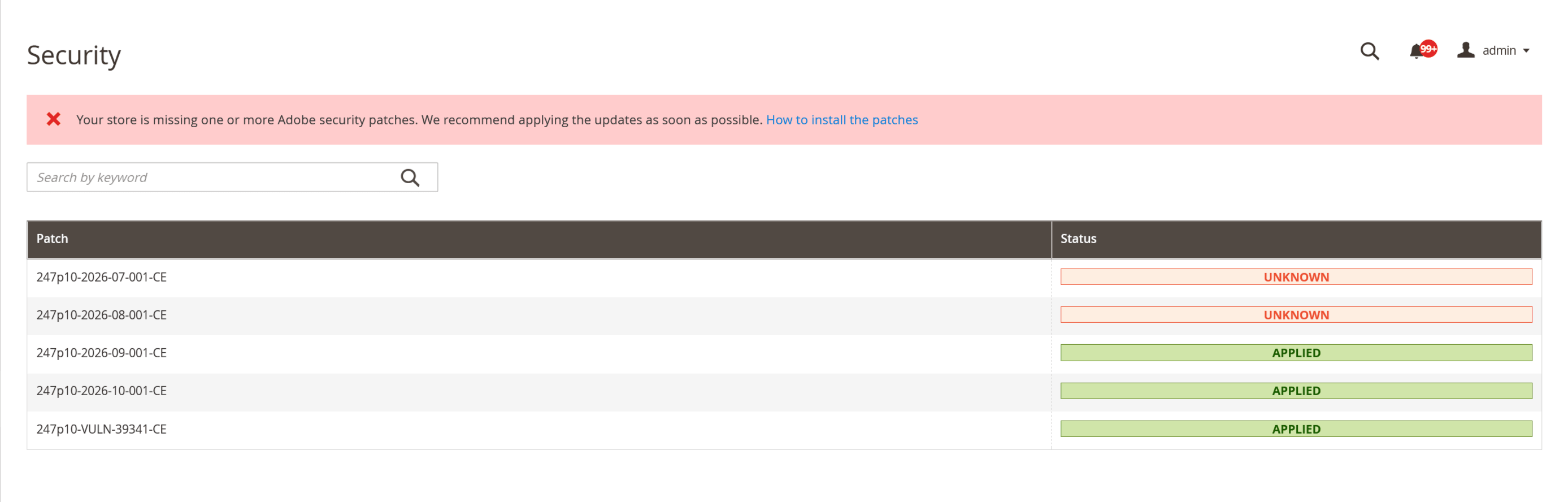
Adobe releases Magento security patches regularly, and missing one is easy. Our Security Patch Monitor, part of the swissup/module-core module, checks your store and shows a warning in Magento Admin when an Adobe security patch for your Magento version isn't installed.
Install swissup/module-core
Run from the Magento root directory:
composer require "swissup/module-core:^1.15"
php bin/magento setup:upgrade
php bin/magento cache:flush
In production mode, also run php bin/magento setup:di:compile and php bin/magento setup:static-content:deploy after setup:upgrade.
How it works
- Check patch status. The module uses Adobe's official
patch-statustool, which ships with Adobe's July 2026 security patch. It checks which security patches apply to your Magento version and which are installed. - Find missing patches. Patches that apply to your store but aren't installed are reported as missing.
- Notify administrators. A notification appears in Magento Admin with a link to instructions.
Good to know: the module only reports. It doesn't install patches or change your code. It doesn't check PHP or other server software, so it wouldn't warn you about the PHP issue above. Urgent hotfixes released outside Adobe's regular patch sequence, such as CVE-2026-75650, may not be detected.
More information: Magento 2 Security Patch Monitor.
Need help? If you don't have a Magento developer, contact us and we'll help you check your store.