
What the warning means
How the module works
- Check patch status. CVT checks which security patches apply to your Magento version and components, and which are installed.
- Identify missing patches. Patches that apply but aren't found are reported as missing, based on Adobe's patch information.
- Notify administrators. A notification appears in Magento Admin with a link to this page.
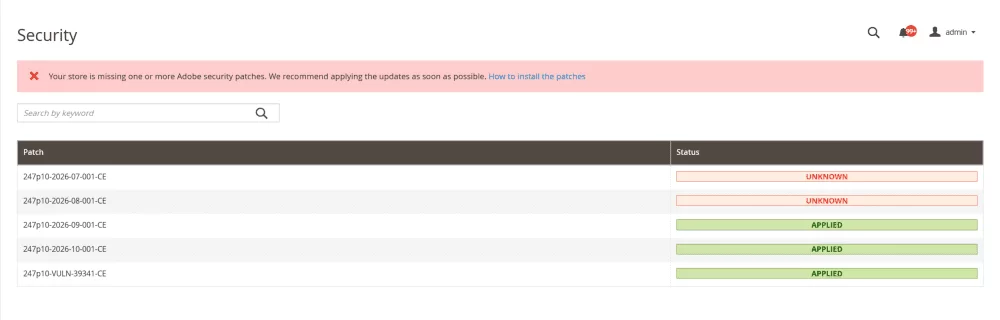
The module only reports. It doesn't install patches or change your code. It tracks Adobe's monthly security patches, so urgent hotfixes released outside that sequence (such as APSB26-146) may not be detected. Extensions and server software aren't checked.
Install Swissuplabs Core
Security Monitor Check is included in swissup/module-core and works from version 1.15. If you already use Swissuplabs extensions, update the module to 1.15 or later.
Requires swissup/module-core 1.15 or later
# Install or update to 1.15+
composer require swissup/module-core:"^1.15"

# Enable and apply
php bin/magento module:enable Swissup_Core
php bin/magento setup:upgrade
php bin/magento cache:flush
Check the installed version with composer show swissup/module-core.
What to do
- Review the warning. Note which patches are reported as missing.
- Contact your Magento developer or hosting provider. Ask them to verify the result (see Check patches from the command line).
- Apply the missing patches. See Find and apply a missing patch. Back up the store and test on staging before production.
- Check again. Run the check again and confirm no patches are reported as missing.
Check patches from the command line
Run from the Magento root directory. Requires PHP 8.1 or later and the system patch command.
# Is the tool installed?
php vendor/bin/patch-status --version

# Full report (JSON)
php vendor/bin/patch-status

# One row per CVE (CSV)
php vendor/bin/patch-status --format=csv
If the first command fails, the tool isn't installed. Install the July 2026 patch first.
Key fields in the report
missing_patches- patches that apply to your store but aren't installed
unknown_patches- patches the tool couldn't confirm (details in
var/log/patch_status.log) vulnerability_status- each CVE as
PROTECTEDVULNERABLEUNKNOWNorNOT_APPLICABLE
Example (shortened)
"base_version": "2.4.6-p15",
"applied_patches": ["246p15-2026-07-001-CE"],
"missing_patches": ["246p15-2026-08-001-CE", "246p15-2026-09-001-CE"]
Install the tool (July 2026 patch)
The tool ships with Adobe's July 2026 security patch (APSB26-73 release notes). Applying the patch's CE file installs it at vendor/bin/patch-status.
- Check your exact version with
php bin/magento --version. The patch only applies to the versions below. On an earlier patch level (for example 2.4.7-p8), upgrade first. -
Download and unzip the patch for your version:
Magento version Download 2.4.9 2-4-9-jul-2026.zip 2.4.8-p5 2-4-8-p5-jul-2026.zip 2.4.7-p10 2-4-7-p10-jul-2026.zip 2.4.6-p15 2-4-6-p15-jul-2026.zip 2.4.5-p17* 2-4-5-p17-jul-2026.zip 2.4.4-p18* 2-4-4-p18-jul-2026.zip * Adobe Commerce only. Sign in with your Composer public key (username) and private key (password).
-
Copy the patch files to the Magento root and apply them in order: CE, then EE (Adobe Commerce), then B2B if installed. If
-p1fails, try-p2.patch -p1 < 246p15-2026-07-001-CE.patch patch -p1 < 246p15-2026-07-001-EE.patch
- Flush the cache:
php bin/magento cache:flush - Confirm the tool works:
php vendor/bin/patch-status --version
Adobe Commerce on Cloud Follow the Cloud steps in Adobe's release notes instead.
Composer-built deployments Add the patches to your build (for example with cweagans/composer-patches) so the next deploy doesn't remove them.
Find and apply a missing patch
- Take the ID from
missing_patches. For example,246p15-2026-08-001-CEis the August 2026 CE patch for Magento 2.4.6-p15. - Find the Adobe Commerce bulletin from that month in Adobe's security bulletins. August 2026, for example, is APSB26-92.
- In the bulletin's Solution section, open Release Notes. It has a ZIP download for each supported version. If there's none for your version, upgrade to a supported version first.
- Apply the file with the same name as the ID (
246p15-2026-08-001-CE.patch) the same way as the July patch.
If several patches are missing, apply them oldest month first. Within a month, apply CE, then EE, then B2B.
Need help?
If you don't have a Magento developer, contact us and we'll review your store's patch status with you.