

A website speed is a direct way to get a higher ranking. Customers prefer shopping in a store with fast loading speed. Thus, the reason for all-round use of Magento 2 speed optimization tool is common sense.
If you're not satisfied with the current performance of your website or want to speed it up, we offer to use our Magento 2 speed extension.
The less your visitors wait for the page loading, the faster they start shopping. The primary task of the Page Speed module is to help you to reduce server response time required to load images or HTML document. The extension provides your site with advanced approaches like:
- JavaScript, CSS, HTML minification
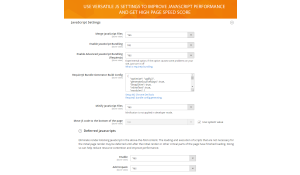
- Innovative Js bundling method
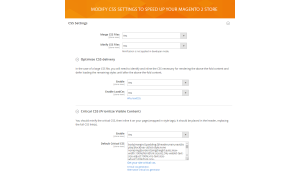
- CSS delivery optimization
- Prioritizing visible content
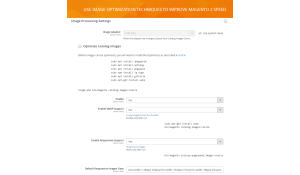
- Catalog images compression
- Automating image optimization via cron jobs
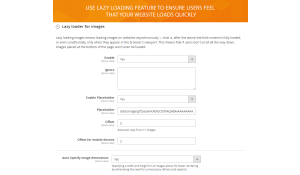
- Lazy loading images technique
- Adding expires headers
- DNS-prefetch
- WebP images support
- Responsive images technique
- HTTP/2 push server preload
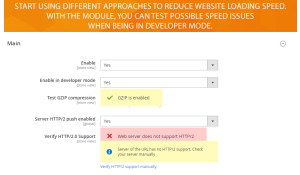
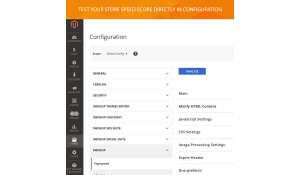
You can start testing pagespeed issues in Magento 2 speed up developer mode. Our module also includes the Analyze config to help you test page speed score directly from the backend
Extension Demo
- Extension demo server - demo site
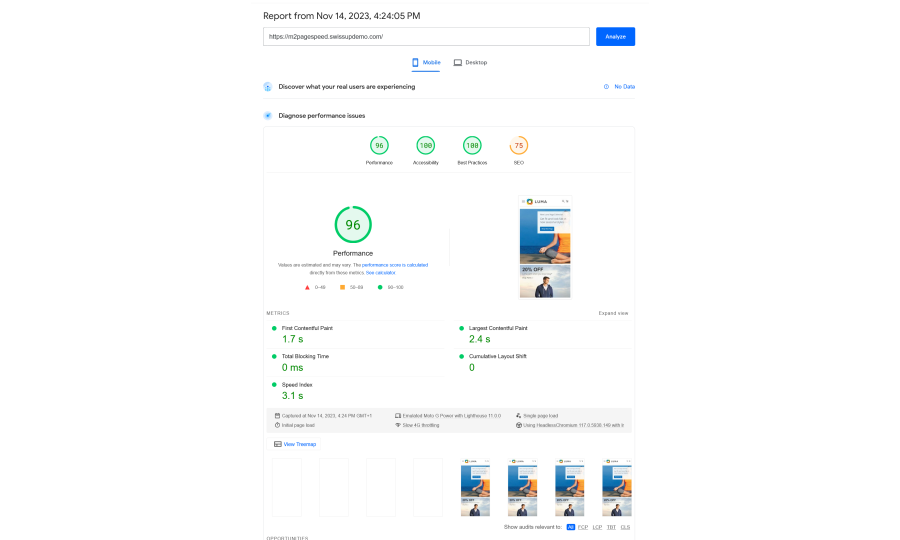
- Google page speed test - test results
- GtMetrix page speed test - test results
Extension approved on Magento Marketplace
- Free installation
- Activate up to 10 times
- All extensions $79
- Approved on Magento Marketplace
Take advantage of Gzip compression

Minify Javascript files to speed up execution time

Minify HTML to reduce download and parse times

Minify CSS to improve your page load performance

Prioritize the critical CSS to render your site fast

Optimize images for page speed

Decrease load times for returning visitors

Speed up web pages by pre-resolving DNS

Provide users with WebP optimized images

Optimize image delivery to different devices

Reduce page rendering time via Server Push
Control font performance with font-display
Page Speed 1.21.5
4th of November 2026Fixed
- Slow uncached pages with many WebP images (#149, closes #148): wrapping images in
<picture>for WebP creates new elements whose HTML has to be merged back into the page, and that merge restarted its whole search after every element it placed, so its cost grew with the cube of the number of images. On the product page reported for 1.21.4, with about 80 WebP images, HTML patching (applyPatchesToOriginalHtml()) still took about 500 ms after the 1.21.4 diagnostics change; it now takes 39 ms, and PageSpeed processing of that page dropped from about 550 ms to 90 ms. The resulting HTML is byte-for-byte the same. Each patching stage now also has its own Magento Profiler section (patchManager.groupAndSort,patchManager.applyOtherPatchesand others), so a slow stage shows up directly in profiler output.
Page Speed 1.21.4
3rd of November 2026Fixed
- Slow uncached page generation during HTML patching (#147, closes #146): informational patch diagnostics ran on every uncached response and repeatedly scanned the full HTML. On the reported product page,
applyPatchesToOriginalHtml()took 517 ms although actual patch application took only 24 ms. Diagnostics now run only withPAGESPEED_DEBUG, required structural validation reuses existing counts, and debug script comparison scales linearly. Synthetic script-heavy verification dropped from 18 ms to 1.8 ms for 200 scripts and from 111–113 ms to 4.8 ms for 600 scripts.
Page Speed 1.21.3
27th of October 2026Fixed
- Slow HTML processing on pages with thousands of images (#145, closes #144): every tracked
<img>(also<script>,<link>and<style>) was matched to its place in the page by comparing itsid/src/hrefwith every element of the same tag, so the work grew with the square of the number of images. Pages with 16,000 images took 7.8 s to process, now 0.23 s. Category pages showing all products, brand and attribute pages listing every option logo, lookbooks and image mega menus benefit most. Images whosesrccontains an encoded&(for example resized-image URLs with several parameters) are now matched directly instead of through slower fallbacks.
Page Speed 1.21.2
27th of October 2026Fixed
- Slow HTML processing on pages with thousands of same-tag elements (#142, closes #141): since 1.17.4 the module found each tracked element's position by walking all elements with the same tag from the start of the page, so the work grew with the square of their number. On one store's HTML sitemap (~7,500 product links) this step went from 0.7 s to 25 s per request on PHP 8.2 and overloaded the server under crawler traffic. Positions are now built in a single pass over the page. Wrapping many images in
<picture>for WebP had the same problem and is now linear too. - WebP not applied to product gallery and Page Builder background images (#140, #143, closes #139): since 1.14.0 "Replace WebP in inline JS" (
pagespeed/image/optimize_webp_js_replace) had no effect. Images in thetext/x-magento-initgallery config (fotorama and Breeze) and in Page Builderdata-background-imageskept loading the original jpg/png after JS init, and on mobile product pages that request is often the LCP. These URLs are rewritten to WebP again, includingurl(...)inside CSS strings, comma-separated lists and mixed-case extensions such as.Jpg.
Page Speed 1.21.1
15th of October 2026Fixed
- Default Critical CSS ignored when "Use built-in critical CSS feature" is off (#137, closes #133): with
pagespeed/css/critical_enableon anddev/css/use_css_critical_pathoff, stylesheets were deferred but the "Default Critical CSS" never reached the page, so it rendered unstyled until the CSS loaded. The value was only appended to Magento's critical CSS block, which Magento renders solely when the built-in path is on (regression since 1.10.0). The module now prints the default critical CSS itself in this case, without duplicating it when the built-in path is on. - Stylesheets deferred on pages without critical CSS: with the built-in path off and an empty "Default Critical CSS", every stylesheet still became
rel="preload", causing a flash of unstyled content. Stylesheets are now deferred only when the page has critical CSS. With the built-in path on (including Breeze themes) nothing changes. - Security: Low — improved safe handling of configured critical CSS.
Behaviour changes: with dev/css/use_css_critical_path off and no Default Critical CSS, stylesheets are no longer deferred.
Page Speed 1.21.0
9th of October 2026Changed
- Advanced JS Bundling moved to a separate package (#134): the feature now lives in
swissup/module-advanced-js-bundling(Swissup_AdvancedJsBundling), which this version requires, so Composer installs it automatically. Config paths (pagespeed/js/enable_advanced_js_bundling,pagespeed/js/rjs_build_config) and the bundle directory are unchanged, so existing settings andapp/etc/rjs.jsonkeep working. The new module rebuilds bundles when therjs.jsonconfig changes, has aswissup:js-bundling:generatecommand and an optional dependency resolver. - Advanced JS Bundling is no longer enabled by the marketplace installer. Measurements on a live store showed it does not improve FCP/LCP and can delay rendering, so enable it only after testing your own pages.
Behaviour changes: after the update run rm -rf generated/code/Swissup/Pagespeed, bin/magento setup:upgrade and bin/magento cache:flush. Helper\Config::isAdvancedJsBundling() and getRjsJsonConfig() were removed from this module; the config path constants are kept as deprecated.
Page Speed 1.20.1
8th of October 2026Fixed
- Security: Low — debug options are now disabled by default.
- Security: Low — strengthened critical CSS generation: secure connection and content validation.
- Security: Low — improved request handling for critical CSS generation in the admin.
- Security: Low — narrowed Content Security Policy rules on the storefront.
Behaviour changes: debugging must now be explicitly enabled, and critical CSS generation uses improved request protection.
Page Speed 1.20.0
30th of September 2026Added
- Replace WebP in inline JS (#129, closes #126): New option
pagespeed/image/optimize_webp_js_replace(default1) in the WebP group, shown when WebP and "Add picture tag" are both enabled. Turn it off to get a real<picture>fallback:<img>src/srcsetand inline JS keep the original jpg/png, and the.webpURLs go only into<source type="image/webp">, so browsers without WebP support (Safari/iOS older than 14) load the original image. Without the picture tag the option is forced on, because<img>always gets the WebP URL and inline JS such as the Breeze gallery JSON has to match it. Images already inside a<picture>or without a WebP variant are left untouched when the option is off. - Improved WebP diagnostics: debug reporting now helps identify eligible background images in inline styles and suggests compatible fallback styling.
Fixed
- Lazy-load offset cached for the wrong device by FPC/Varnish (#127, closes #125):
LazyLoad::getOffset()chose betweenlazyload_mobile_offsetandlazyload_offsetfrom the request User-Agent, but the optimizer runs before the full page cache stores the page and the cache does not vary by device. The first visitor after a purge chose the offset for everyone: a phone warming the cache lazy-loaded desktop above-the-fold images and hurt LCP, while desktop cache warmers made the mobile offset dead. The offset is nowpagespeed/image/lazyload_offsetfor every visitor. <picture><source>losingsrcsetdescriptors andsizes(#131, closes #130): With "Add picture tag" on, the module built one<source>fromsrcand another fromsrcsetwith bare URLs, dropping thew/xdescriptors andsizes. Thesrcone came first and the browser always picked it, so every viewport loaded the smallest WebP: blurry images on desktop, responsive images effectively disabled. A single<source type="image/webp">is now emitted, fromsrcsetwhen the<img>has one (URLs replaced in place, descriptors kept,sizescopied) and fromsrconly otherwise. If anysrcsetcandidate has no WebP variant, no<source>is added, so the<img>keeps choosing the right size in the original format.
Behaviour changes: pagespeed/image/lazyload_mobile_offset has no effect any more (kept for backward compatibility, marked deprecated in the admin). Stores with "Add picture tag" on get different <picture> markup: one <source> with descriptors and sizes instead of two. Defaults of the new WebP option keep the previous output. Flush the full page cache after updating.
Page Speed 1.19.3
28th of September 2026Fixed
- WebP markup cached for the wrong browsers by FPC/Varnish (#124, closes #123):
Config::isWebPSupport()decided from the request User-Agent (Chrome/Opera/Android/Firefox ≥ 65) whether to emit WebP markup, but the optimizer runs before the full page cache stores the page and the cache does not vary by User-Agent. The first visitor after a purge chose the variant for everyone: a bot, curl or Safari left all visitors on JPEG, and Chrome served.webpto every browser. WebP markup now depends only on the WebP config option.
Behaviour changes: with WebP enabled, every visitor gets WebP URLs in <img> and inline JS, including inside <picture> (kept for Breeze gallery compatibility). Browsers without WebP support (Safari/iOS older than 14) get no fallback; the option comments now say so. A separate "Replace WebP in inline JS" option that would allow a real <picture> fallback is tracked in #126.
Page Speed 1.19.2
21st of September 2026Fixed
- WebP variant not served for images with uppercase extensions (#120):
UrlResolver::resolve()lowercased the file extension before building the webp candidate filename, but the webp files generated on disk keep the original extension case (HandGuard.JPG→HandGuard.JPG.webp). The lookup forHandGuard.jpg.webpnever matched the real file, so the webp version was silently skipped for any image uploaded with an uppercase extension. The resolver now checks both the original-case and lowercased extension when locating the webp file.