

This extension is completely free to use. To install it please place free order on this module by clicking the download button and following the order process. After that please check the installation instructions given to you on the right side of the page. In case you want to download the manual package please log in to your account after placing the order and go to the ”Free products” menu. You can find installation and documentation instructions on our site. In case you have a problem or found a bug please open a ticket on our contacts page.
When it comes to high level of usability, you don’t have to look much further than Easy Catalog Images extension. It was developed for Magento 2 aiming to improve the navigation of your website as well as the user experience. We suggest you to present all available categories in attractive blocks right on the home page. You could also show subcategories along main catalogs.
Try out Easy Catalog Images extension as a tool for:
- Enhancing browsing experience
- Fast adding essential blocks with widgets
- Improving the navigation through the website
- Creating positive visual experience
- Increasing conversion with SEO
- Boosting website traffic
Extension demo:
Easy Catalog Images demo is available at our demo server.
Extension approved on Magento Marketplace
- Free installation
- Activate up to 10 times
- All extensions $79
- Approved on Magento Marketplace
Show nice images along the categories

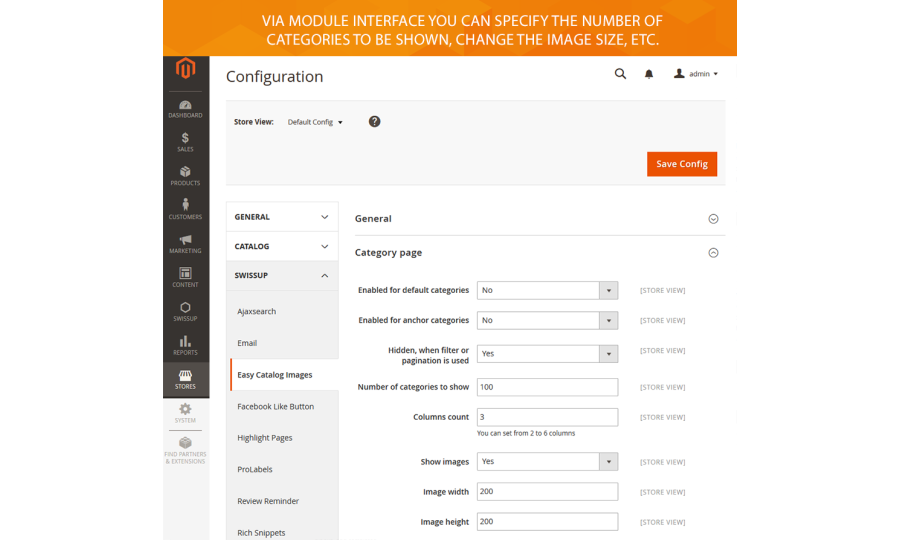
Make the category page informative

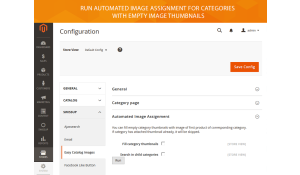
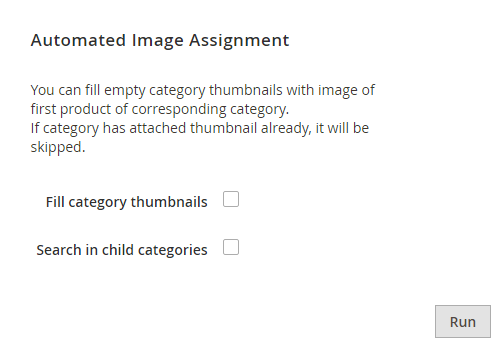
Use automated image assignment option
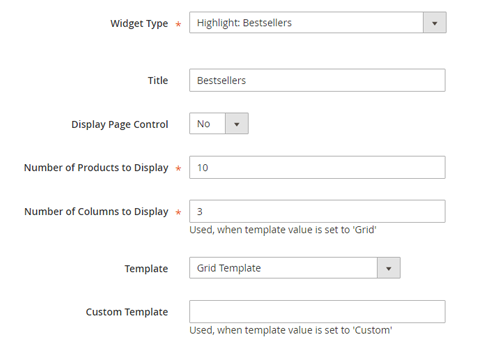
Add blocks via widget
Easy Catalog Images 1.5.12
22th May 2025- Improve performance of widgets enabled via module settings.
Easy Catalog Images 1.5.11
9th April 2025- Do not throw exception when cat_id passed to widget does not exist.
Easy Catalog Images 1.5.10
26th February 2025- Added canonical URL to the Departments Page.
Easy Catalog Images 1.5.9
20th November 2024- Fixed a11y contrast issues.
- Improved ability to use keyboard navigation.
Easy Catalog Images 1.5.8
5th August 2024- Return path to original image if error happens during resize. Previsously we showed image placeholder instead.
Easy Catalog Images 1.5.5
4th May 2024- Breeze: zoom on hover support added.
Easy Catalog Images 1.5.5
27th April 2024- Do not require category_id when inserting widget using Pagebuilder.
Easy Catalog Images 1.5.2
12th March 2024- Do not require category_id when inserting widget using Pagebuilder.
Easy Catalog Images 1.5.2
28th November 2023- Improve breeze compatibility.
- Allow using lazyload attribute.
Easy Catalog Images 1.5.0
25th July 2023- Added ability to cache block result. This options is useful, when block is rendered inside navigation dropdown (Same EasyCatalogImg content on all pages).
- Reduced count of generated responsive images from 6 to 3.
Easy Catalog Images 1.4.23
23th November 2022- Improved Breeze Theme integration
Easy Catalog Images 1.4.19
10th April 2022- Improved integration with Magento Pagebuilder module
- Fixed js error when adding component into the page.
- Fixed preview styles.
- Fixed not working categories_to_hide/show, and sizes options.
- Magento Coding Standard fixes.
Easy Catalog Images 1.4.16
30th November 2021- Add magento pagebuilder integration (widget)
- Remove synonym data-content-type (EasyCatalogImg => easycatalogimg)
Easy Catalog Images 1.4.15
11th June 2021- Fixed not found image in widget when it should use fallback and take category image attribute.
- Prevent image duplicates in srcset attribute.
Easy Catalog Images 1.4.14
21th May 2021- Improve image resizer - allow to define width only. Useful when images has different heights.
- Responsive images support added - various devices will now receive images resized according to their screen size.
Easy Catalog Images 1.4.13
22nd January 2021- Fixed possible broken image thumbnail in Magento 2.4.
Easy Catalog Images 1.4.12
25th November 2020- Do not modify category layout via layout.xml
- Do not output subcategories block on root category (Attribute Pages compatibility)
- Widget now can be added using backend widget interface. Previously, block was not displayed if added in such a way.
Easy Catalog Images 1.4.11
6th August 2020- Added category to hide and listing mode options to departments page configuration
Easy Catalog Images 1.4.10
3rd August 2020- Added margin on AMP homepage
- Prevent styles duplication in styles-m and styles-l files
- Fixed broken thumbnail upload in Magento 2.4
Easy Catalog Images 1.4.8
15th May 2020- 16 locales added to translate backend and frontend phrases.
Easy Catalog Images 1.4.7
17th February 2020- CSS style optimizations.
Easy Catalog Images 1.4.6
17th October 2019- Code cleanup.
Easy Catalog Images 1.4.4
24th September 2019- Merge module styles with theme and use its less variables.
Easy Catalog Images 1.4.4
19th August 2019- Added ability to show parent category link as button. Used at ArgentoForce theme.
Easy Catalog Images 1.4.2
3rd June 2019- Fixed ability to apply different thumbnail per store view
Easy Catalog Images 1.4.2
2nd May 2019- Simplify grid styles
Easy Catalog Images 1.4.1
29th January 2019- Fixed possible PHP warning on PHP 7.2
Easy Catalog Images 1.4.0
31st October 2018- Internal module naming convention was updated. We applied this changes to reach full compatibility with Magento Marketplace policy and new Composer-based installation process.
Easy Catalog Images 1.3.0
21th of September 2018- Added ability to use widget with categories of one StoreGroup at another StoreGroup. (Previously there was an issue with invalid urls for a such kind of crosslinks)
- Fixed broken image url, if width wasn’t set to a proper number.
Easy Catalog Images 1.2.0
27th of March 2018- Added configurable ‘Departments’ page with masonry layout style
Easy Catalog Images 1.1.4
27th of October 2017- Magento 2.2.0 compatibility
Easy Catalog Images 1.1.0
5th of July 2016- Magento 2.1.0 compatibility
- Added ACL resource file
Easy Catalog Images 1.0.4
23th of June 2016- Fixed missing class error in backend model of thumbnail attribute.
Easy Catalog Images 1.0.1
18th of May 2016- Initial extension release