
This extension is completely free to use. To install it please place free order on this module by clicking the download button and following the order process. After that please check the installation instructions given to you on the right side of the page. In case you want to download the manual package please log in to your account after placing the order and go to the ”Free products” menu. You can find installation and documentation instructions on our site. In case you have a problem or found a bug please open a ticket on our contacts page.
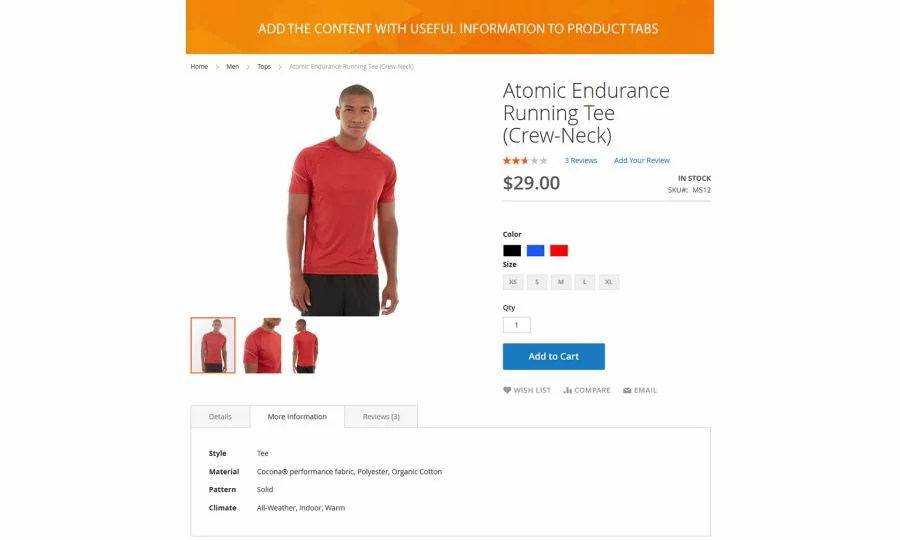
Make customer experience better with product tabs. The tabbed content is a proven way to effectively present lots of different information about a website or a product on the same page.
The Product Tabs module is the best tool to show the product info tabs in Magento 2 store. It includes the advanced features to help you customize the tabs easily. The extension allows using a powerful widget functionality for adding tabs to whatever page you need.
Basically, the module will help you to:
- Replace the default Magento system tabs with attractive custom tabs.
- Add the unlimited number of product tabs.
- Provide a mobile-friendly tabbed content.
- Show product tabs with dynamic content.
- Unset blocks shown in a tab to avoid content duplicating.
- Show the content taken from static blocks, CMS pages, etc.
Extension approved on Magento Marketplace
- Free installation
- Activate up to 10 times
- All extensions $79
- Approved on Magento Marketplace
Improve user experience with tabbed content

Customize the product info tabs

Create a custom tab with dynamic content

Get mobile-friendly tabs

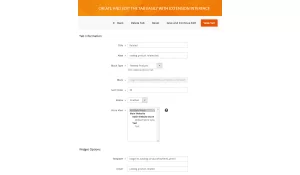
Use widgets to add the tab

- "Template" allows using a custom template for the tab.
- "Unset" allows entering a block name to remove it from the page.
- "Identifier" allows selecting a static block in a drop-down.
- "Block" allows entering block name from the custom tab.
- "Content" allows creating HTML content. Supports WYSIWYG editor.
- "Attribute Code" allows selecting the attribute from a dropdown to be shown in the tab.
Add an informative tabbed content

- Additional Information type is for the product attributes' display.
- CMS Static Block type shows a content from the selected static block.
- Custom Block type creates a custom tab by using block and template.
- HTML content type shows HTML content created with WYSIWYG editor.
- Product Description type is for the product description display.
- Product attribute type shows a selected product attribute value.
- Product’s Reviews type enables the product reviews display.
- Related Products type enables the related products grid display.
- We Also Recommend type shows the upsell products.
Product tabs 1.14.1
12th of November 2026- Fixed: tabs set to "Load content with ajax" were still rendered on the server and the markup thrown away, so the page paid for such a tab twice - once while building the page, and again when the browser requested it. Related, Upsell and Cross-sell tabs are the usual victims: on one store they accounted for 117 ms of the 179 ms spent on the whole tabs block. Empty tabs are still hidden - product list tabs are now asked for their item count instead of their markup.
- Related, Upsell and Cross-sell tabs created by the extension installer now default to "Load content with ajax". Tabs that already exist in your store are not changed.
- Note: an ajax tab is not part of the server-rendered HTML, so links to related, upsell and cross-sell products are not in the page source for crawlers. If internal linking to those products matters to you, uncheck "Load content with ajax" for those tabs in Swissup > General > Easy Tabs.
Product tabs 1.14.0
19th of October 2026- Fixed stale full page cache: new or enabled tabs now appear on already cached pages, ajax tab responses carry product cache tags, and GraphQL
getEasyTabresponses carry CMS block cache tags. - Fixed mass "Enable"/"Disable" in the Easy Tabs grid skipping widget tabs.
- Fixed tab content being double-encoded in the "Content id/code" field when an extension installer updated an existing tab.
- Cached the "no tabs" result, so a page without tabs no longer repeats the same tab query.
- Fixed guest customers failing tab condition validation when the session carried no customer group.
- Ajax tabs: tightened which tab a request may load and how its parameters are read, and the controller now checks that the requested product is really available before rendering.
- Fixed a JavaScript error thrown when tabs were removed from the page, tab anchors containing special characters or umlauts, and the previous/next scroll buttons on the tab strip.
- Fixed the missing
aria-levelattribute on tab headings in the expanded layout, in both the default theme and Breeze.
Product tabs 1.13.6
8th of October 2026- Security: Medium — strengthened product and tab visibility enforcement across storefront interfaces.
Product tabs 1.13.5
5th of October 2026- Fixed the ARIA tablist markup in the expanded and accordion layouts.
Product tabs 1.13.4
2nd of July 2026- Product Attribute tab: Excluded root and current store's root category from the rendered "Categories" attribute value.
Product tabs 1.13.3
2nd of July 2026- Product Attribute tab: Added support for rendering the "Categories" attribute - shows names of categories assigned to the product.
Product tabs 1.13.2
5th of December 2025- Updated Breeze integration.
Product tabs 1.12.18
9th of April 2025- PHP 8.4 support added.
- Magento 2.4.8 support added.
- Breeze: Fixed CSS style when scroll-reveal styles are enabled.
Product tabs 1.12.15
26th of February 2025- Breeze: Fixed layout shift when all tabs are inactive by default
Product tabs 1.12.14
12th of December 2024- Fixed unwanted scroll to tab when changing configurable option
- Fixed js error when URL anchor contains numbers or umlauts.